

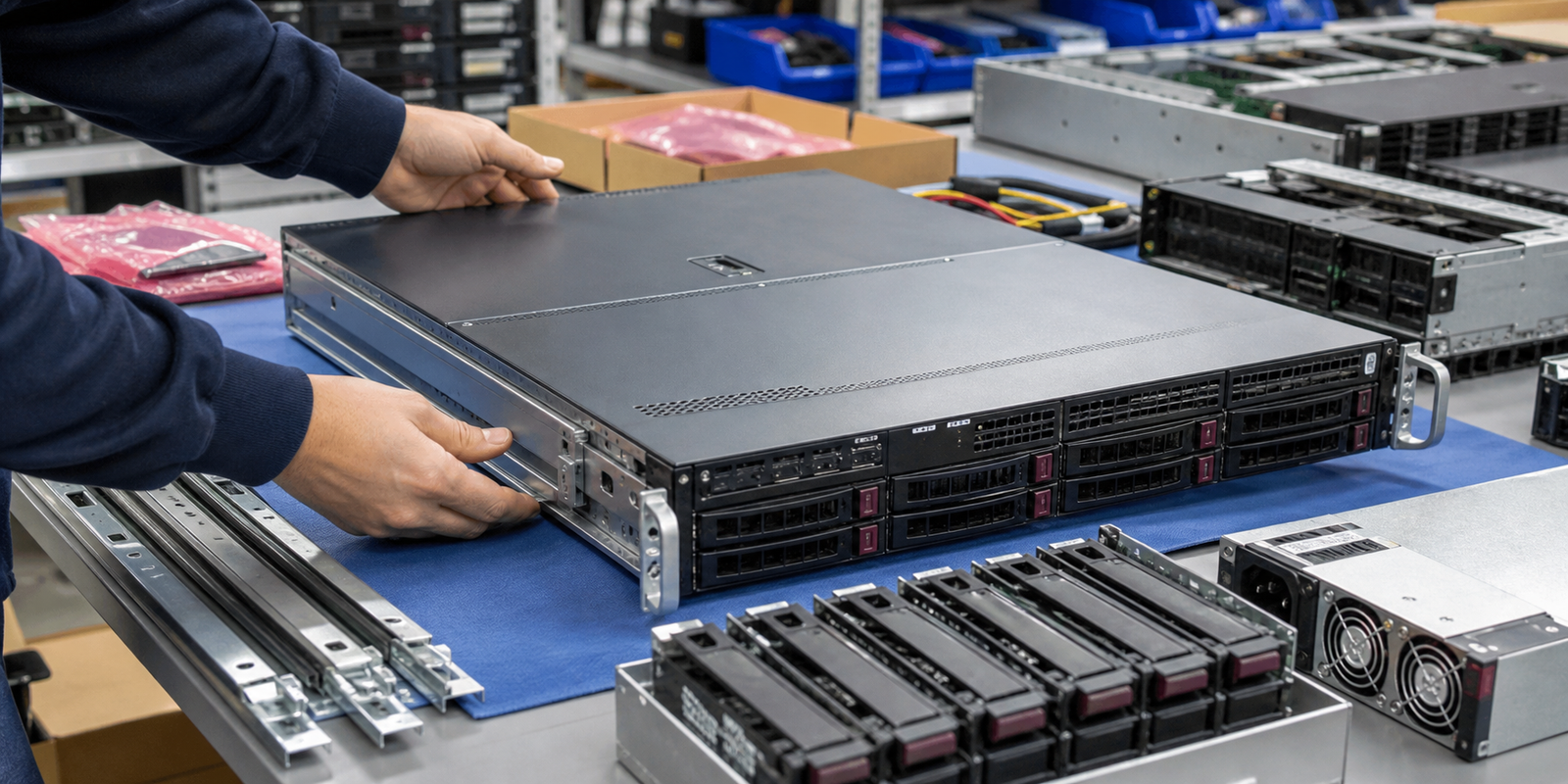
A used server chassis is not just a metal box. It decides the rack fit, airflow path, drive bay count, backplane, power supply type, fan layout, motherboard fit, riser path, cable routing, and how the server can be packed, installed, and serviced.
TBR Trade Group helps buyers source server and data center hardware, tested used enterprise hardware, bulk computer parts, GPUs, CPUs, memory, storage, power supplies, and replacement parts. Chassis requests move faster when the buyer treats every accessory as part of the quote, not as an assumption.
Define What Barebones Means
The word barebones can mean different things depending on the seller. One quote may include only the chassis shell and motherboard. Another may include power supplies, fans, backplane, risers, heatsinks, drive trays, rails, and cables. A third may be a nearly complete server with no CPUs, memory, or drives.
For a repair bench or resale operation, that difference affects cost, labor, time, and buyer complaints. Write the definition into the quote before comparing prices.
- State whether the order is chassis-only, motherboard-and-chassis, or a fuller barebones platform.
- List rails, rack ears, bezel, drive trays, caddies, blanks, risers, heatsinks, fan modules, cables, and power supplies.
- Separate tested working units from repairable, donor, incomplete, as-is, or parts-only lots.
- Ask whether serial numbers, service tags, photos, or packing lists are available before shipping.
Start With Rack Size, Depth, and Form Factor
Rack fit should be checked before component fit. A 1U, 2U, 3U, 4U, tower, blade, short-depth, or storage-dense chassis can all serve different buyers. Supermicro's current chassis catalog shows how much variation exists in real inventory: form factor, power supply, efficient PSU level, hot-swap drive bays, fixed bays, drive form factor, and special features are separate filters.
Dell's rack rail guidance also notes that rack servers can mount in standard 19-inch racks, while tower systems may require a tower-to-rack conversion kit. That is practical buying information. A good price on the wrong depth, rail type, or mounting kit can still create a receiving problem.
- Confirm 1U, 2U, 3U, 4U, tower, short-depth, blade, JBOD, or storage chassis needs.
- Check rack depth, rail compatibility, cable-management needs, rack-ear condition, and bezel requirements.
- Ask whether the unit includes static rails, sliding rails, screws, cage nuts, cable arms, and mounting hardware.
- For dense orders, confirm pallet dimensions, lift-gate needs, dock access, and whether units ship boxed or palletized.
Rails Are Not a Small Detail
Rails are often missing from used server lots because they get separated during data center removals. That does not make them optional for every buyer. Dell explains that static rails mount a server without service movement, while sliding rails allow the server to be pulled forward for work even when another server is installed above it.
If a buyer plans to rack the server, rails can affect service access, airflow discipline, safety, installation time, and resale value. If rails are not included, the quote should say that clearly.
- Ask for rail type, rail part number, rack depth range, screws, and cable-management arm status.
- Check whether rails are OEM, compatible replacement, static, sliding, tool-less, or missing.
- Inspect rack ears, handles, latches, and front bezels for bends or broken tabs.
- Do not assume one generation of rails fits another chassis generation.
Backplanes and Drive Trays Decide Storage Fit
Storage is where many barebones orders break down. A chassis may have 2.5-inch bays, 3.5-inch bays, hot-swap trays, fixed bays, NVMe bays, SATA/SAS bays, hybrid backplanes, expander backplanes, or direct cabling. The front of the chassis can look right while the backplane, cable, or controller path is wrong.
Buyers sourcing storage-heavy systems should match the chassis discussion with TBR's used RAID controller and HBA buying guide and storage buying guides. The chassis, backplane, controller, cables, firmware mode, and drive type need to work together.
- Confirm 2.5-inch vs 3.5-inch bays, bay count, tray count, blanks, screws, and carrier condition.
- Ask whether the backplane is SATA, SAS, NVMe, hybrid, expander-based, or direct-attached.
- Check whether mini-SAS, SlimSAS, OCuLink, U.2, U.3, or proprietary cables are included.
- Separate empty chassis testing from full storage-path validation with drives and controllers installed.
Power Supply Fit Affects Cost and Cooling
Used chassis may ship with no power supplies, one supply, redundant supplies, mismatched wattages, or missing blanks. For repair stock that may be acceptable. For deployment, resale, labs, or GPU builds, power supply details need to be exact.
ENERGY STAR's enterprise server guidance says certified servers use efficient components such as CPU and power supply hardware, and that power-management settings are part of the efficiency value. In used sourcing, buyers should still check the actual PSU model, wattage, efficiency rating, input voltage, redundancy, and whether the full chassis configuration was tested under realistic load.
- Confirm PSU quantity, wattage, part number, voltage range, efficiency level, redundancy, and blanking panels.
- Check whether power supplies match each other and match the chassis generation.
- Ask whether power-on, redundancy, fan behavior, warning lights, and management sensors were checked.
- Use TBR's used server power supply buying guide when quoting spare PSUs or mixed server lots.
Cooling Is a Chassis-Level Requirement
Servers are built around airflow. Fans, shrouds, blanks, drive fillers, risers, cable routing, heatsinks, and rack layout all change thermal behavior. ASHRAE's AI data center energy framework recommends hot/cold aisle layout, containment, reduced bypass and recirculation, right-sized airflow, rack-inlet monitoring, and supply temperatures within ASHRAE TC 9.9 guidance after controls are in place.
That does not mean every used chassis buyer needs a full data center engineering review. It does mean the chassis should not be quoted separately from the hardware it will cool. A 1U chassis built for low-profile cards is not the same risk as a 4U GPU platform or a storage chassis full of spinning drives.
- Confirm fan count, fan modules, air shrouds, blanking panels, drive blanks, and front-to-back airflow.
- Check chassis support for high-TDP CPUs, GPUs, RAID cards, dense storage, and full-length PCIe cards.
- Ask whether fan speed, sensor readings, warning lights, and management logs were checked during testing.
- For deployment lots, match chassis airflow to rack layout, inlet monitoring, and the buyer's room conditions.
Motherboard Fit Cannot Be Guessed
Motherboards, front-panel boards, riser boards, power distribution boards, backplanes, fans, and cables may be specific to a chassis family or OEM generation. A board that posts on a bench may still fail as a practical build if the front panel, power harness, backplane, or risers do not match.
If the order includes the motherboard, pair this checklist with TBR's used server motherboard buying guide. If the order is chassis-only, ask whether the chassis accepts the target board size and connector layout before buying.
- Confirm chassis family, board size, standoff pattern, front-panel connector, power distribution, and fan headers.
- Ask whether the quote includes the motherboard, front I/O board, power distribution board, riser cage, and cables.
- Check OEM-specific parts separately from generic ATX, E-ATX, SSI EEB, or proprietary board claims.
- Do not assume a visually similar chassis accepts a different generation board without checking part numbers.
PCIe Risers Drive GPU and Card Support
PCIe support is not only the slot on the motherboard. In rackmount servers, the riser cage, bracket height, cable path, chassis clearance, fan wall, and auxiliary power leads decide what cards can actually fit.
PCI-SIG states that PCIe 6.0 provides a 64.0 GT/s raw data rate, up to 256.0 GB/s through a x16 configuration, and backward compatibility with previous PCIe generations. For used chassis sourcing, the daily decision is more physical: x8 or x16, low profile or full height, half length or full length, one riser or two, airflow over the card, and power for GPUs or accelerator cards.
- Confirm PCIe riser part numbers, lane width, slot height, slot length, and bracket support.
- Ask whether GPU power cables, retimers, OCP NIC slots, mezzanine cards, and blank brackets are included.
- Check whether risers were tested with the motherboard and chassis, not just listed as included accessories.
- For GPU-focused orders, use the data center GPU sourcing page to align card model, cooling, power, and quantity.
Condition Grading Should Cover the Frame
Used chassis condition is partly functional and partly physical. Dented lids, bent rack ears, damaged handles, missing feet, cracked bezels, stripped screws, sharp edges, bad latches, broken tray tabs, missing blanks, and dirty fan modules can all turn into receiving issues.
A clean hardware condition grade should separate cosmetic wear from functional defects. For large lots, photos and sample inspections are useful, but the quote still needs clear acceptance criteria.
- Grade top covers, rack ears, handles, drive bays, trays, bezels, fans, power slots, I/O shields, and rails.
- Call out dents, bent metal, stripped screws, missing screws, cracked plastics, missing blanks, and heavy dust.
- Ask whether units were cleaned, inventoried, photographed, and packed by configuration.
- For resale, define whether cosmetic grade matters more than it would for internal repair stock.
Testing Should Match the Buyer
"Chassis powers on" can mean very little. A useful test may include power-on, POST with board installed, fan detection, PSU redundancy, backplane detection, drive bay checks, management sensors, riser detection, front-panel buttons, LEDs, USB, VGA, network ports, and storage controller recognition.
The right depth depends on the job. A repair shop may accept incomplete donor systems. A business deployment buyer may need tested barebones with serial-level inventory. A reseller may care about tray count, cosmetic grade, rails, and consistent configuration. TBR's warranty, testing, and returns page helps set those expectations before shipment.
- Define test scope: visual inspection, power-on, POST, BIOS access, BMC access, storage path, risers, and ports.
- Ask whether tests were run with included CPUs, memory, drives, controllers, PSUs, fans, and risers.
- Confirm DOA window, replacement process, serial reporting, and what conditions are excluded.
- Keep as-is, repairable, and tested working inventory clearly separated.
Data and Configuration Still Matter
Chassis-only inventory is low data risk, but barebones systems can include boot modules, SSDs, SD cards, DOMs, RAID cache, TPM modules, BMC logs, asset tags, BIOS settings, and management accounts. If any media is included, data handling should be documented.
NIST released SP 800-88 Revision 2 in September 2025 and describes media sanitization as making access to target data infeasible for a given level of effort. For used barebones servers, buyers should separate physical chassis testing from media sanitization, configuration reset, and credential review.
- Ask whether drives, boot modules, SD cards, DOMs, TPMs, or RAID cache modules are included.
- Confirm BIOS, BMC, asset tag, boot order, management account, and event-log reset expectations.
- Request sanitization documentation when storage media is included or when policy requires it.
- If retiring complete systems, use TBR's IT asset recovery process to separate resale, reuse, and secure disposal paths.
Packaging Is Part of the Product
Rackmount chassis are heavy, awkward, and easy to damage at the ears, handles, lids, drive bays, rails, and backplane area. Loose rails can scratch units. Loose trays can break. Power supplies can crush boards or accessories. Barebones orders need better packing than a pile of mixed metal in a pallet box.
The ESD Association says ANSI/ESD S541-2026 defines packaging properties required to protect electrostatic discharge sensitive items through production, transport, and storage. Pair that with normal freight discipline: immobilize heavy chassis, separate fragile electronics, protect corners, and label accessories clearly. TBR's shipping information is the right internal link for freight expectations and destination planning.
- Protect rack ears, handles, lids, front bezels, trays, backplanes, power slots, and rails from impact.
- Bag boards, risers, memory, cards, and drives in ESD-safe packaging when separated from the chassis.
- Label accessories by unit or lot so receivers can match rails, trays, PSUs, cables, and risers quickly.
- For export or palletized freight, define stacking limits, pallet wrap, corner protection, and receiving notes.
Reuse Works When the Configuration Is Honest
Used server chassis and barebones systems can extend platform life and help buyers avoid unnecessary new hardware purchases. ENERGY STAR notes that servers are generally replaced every three to five years depending on application. That replacement cycle creates useful secondary-market inventory, but only if the condition and configuration are honest.
A missing tray is not always a deal breaker. A missing backplane cable, unsupported rail kit, wrong PSU type, broken fan wall, or untested riser may be. The difference should be visible in the quote, the photos, and the packing list.
Bulk Server Chassis Quote Checklist
Before approving a used server chassis or barebones order, send enough detail for an accurate quote:
- Exact OEM model, chassis family, generation, quantity, destination, deadline, and acceptable substitutions.
- 1U, 2U, 3U, 4U, tower, short-depth, blade, storage, GPU, or JBOD form factor requirements.
- Rails, rack ears, bezel, lids, handles, screws, cable-management arm, and rack depth requirements.
- Drive bay count, drive size, tray count, blanks, backplane type, storage cables, and controller path.
- Power supply quantity, wattage, redundancy, efficiency level, blanks, and voltage needs.
- Fan modules, shrouds, blanking panels, airflow direction, and high-TDP CPU or GPU cooling needs.
- Motherboard, front-panel board, risers, power distribution board, I/O shield, and cable expectations.
- Testing scope, cosmetic grade, serial reporting, photos, DOA window, replacement terms, and exclusions.
- Packaging, ESD handling, accessory labeling, pallet rules, freight method, and receiving documentation.
If you are sourcing used rackmount chassis, barebones servers, GPUs, CPUs, ECC memory, storage controllers, power supplies, hard drives, or broader business electronics, include model targets, quantities, accessory needs, condition expectations, accepted substitutions, and destination when you request a quote from TBR Trade Group.
FAQ
Are used server chassis worth buying?
They can be worth buying for repair, spare pools, labs, resale, and cost-controlled deployments when the form factor, rails, trays, backplane, power, cooling, risers, and condition are clearly verified.
What is the biggest mistake when buying used barebones servers?
The biggest mistake is assuming barebones means complete. Every accessory should be listed: rails, trays, risers, fans, PSUs, cables, heatsinks, backplane, bezel, and mounting hardware.
Should I buy chassis-only or a full barebones platform?
Buy chassis-only when you already have compatible boards, fans, trays, power supplies, risers, and cables. Buy a fuller barebones platform when you need a faster assembly path and fewer compatibility surprises.
Do used server chassis need data sanitization?
The chassis itself usually does not hold data. If the order includes drives, boot media, SD cards, DOMs, TPMs, RAID cache modules, or complete systems, require data handling and sanitization documentation separately.
Source Notes
- Supermicro server chassis catalog: Supermicro's chassis listings show form factor, power supply, efficient PSU, hot-swap bay, fixed bay, drive form-factor, and special-feature filters that buyers should define before quoting.
- Dell PowerEdge rack rail guidance: Dell explains static and sliding rail differences, notes standard 19-inch rack mounting for rack servers, and points buyers to model-specific rack compatibility information.
- ENERGY STAR enterprise server guidance: ENERGY STAR highlights server form factor, memory, processor sockets, power supplies, power management, and typical server replacement cycles as buying considerations.
- ASHRAE AI data center energy framework: ASHRAE recommends hot/cold aisle layout, containment, minimized bypass and recirculation, right-sized airflow, and rack-inlet monitoring as data center air-management practices.
- PCI-SIG PCIe 6.0 specification page: PCI-SIG states that PCIe 6.0 provides 64.0 GT/s raw data rate, up to 256.0 GB/s through x16, and backward compatibility with previous generations.
- NIST SP 800-88 Revision 2 announcement: NIST describes media sanitization as making access to target data infeasible and frames sanitization controls around reuse and disposal based on information sensitivity.
- ANSI/ESD S541-2026: The ESD Association says this standard defines packaging properties required to protect electrostatic discharge sensitive items through production, transport, and storage.