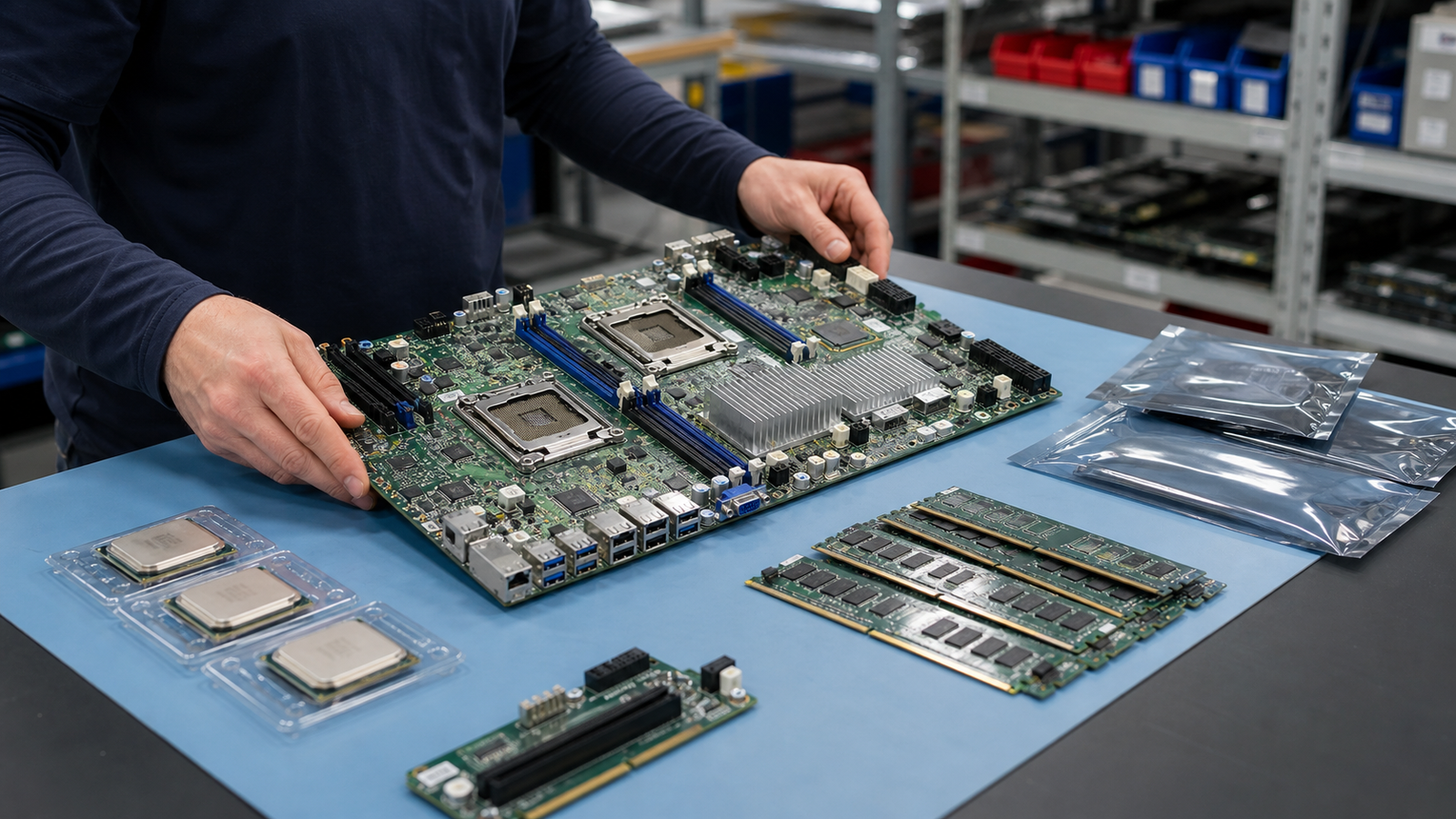
A server motherboard is not a generic board with a processor socket. It controls the CPU family, memory type, PCIe layout, storage headers, power connections, fans, sensors, remote management, chassis fit, and firmware behavior. A buyer can receive a clean board and still be stuck if the revision, BIOS, BMC, riser, backplane, or heatsink plan is wrong.
TBR Trade Group helps buyers source tested used enterprise hardware, bulk computer parts, servers, GPUs, CPUs, memory, storage, and replacement components. Server board requests move faster when the buyer shares exact model targets, acceptable substitutions, generation, socket, revision, accessories, destination, and the reason for the order.
Start With the Repair or Build Plan
The first question is not "what is the cheapest board?" It is what problem the board needs to solve. A replacement board for a failed production server, a barebones resale build, a lab node, a parts-recovery lot, and a test bench do not carry the same risk.
If the board is replacing a failed system board, use the original system as the baseline. If the board is for resale or a new barebones build, define the chassis, CPU, memory, storage, risers, power supplies, fans, rails, and test expectations before comparing price.
- Separate repair boards, matched spares, lab boards, barebones systems, resale stock, and parts-only lots.
- Send the server model, motherboard model, board revision, serial needs, chassis, and target processor family.
- State whether the order needs board-only units, boards with heatsinks, or complete barebones kits.
- Define whether substitutions are acceptable or whether part-number matching is required.
Motherboard and Barebones Are Different Orders
A used server motherboard is the board itself. A barebones server may include the chassis, power supplies, fans, backplane, heatsinks, risers, cables, rails, and sometimes drive trays. Those items are not small details. They decide whether the hardware can be assembled, cooled, powered, mounted, and tested.
Buyers should not let a quote blur the difference. A board-only lot may be right for repair operations. A deployment or resale buyer may need a complete platform with matched accessories and a packing list.
- Ask whether the quote is board-only, board with accessories, or a full barebones platform.
- List heatsinks, risers, I/O shield, TPM module, backplane cables, fans, power harnesses, and drive trays when needed.
- Confirm whether the chassis is rackmount, tower, proprietary OEM, OCP-style, or bench-test only.
- Separate tested working boards from no-post, repairable, donor, or as-is inventory.
Socket and CPU Generation Come First
Processor fit starts at the socket and platform level. Intel's current Xeon socket guidance says Xeon processors require platform-specific sockets, and that each socket generation is electrically and mechanically unique. It also notes that CPU sockets are not interchangeable between Xeon generations. AMD's EPYC 9005 notes are similar in practice: EPYC 9005 uses the SP5 socket, but buyers still need to check system support with the server manufacturer.
That is why a buyer should not quote a board by socket alone. BIOS version, chipset, board revision, power delivery, thermal support, CPU stepping, single-socket versus dual-socket layout, and OEM qualification can all decide whether the processor actually works.
- Confirm exact socket, processor family, generation, stepping support, and TDP range.
- Ask whether the BIOS version supports the target CPUs before the board ships.
- Check single-socket, dual-socket, embedded CPU, and soldered BGA cases separately.
- When matching a failed server, use the original part number and board revision as the starting point.
Memory Compatibility Is Not Optional
A server board may support DDR4, DDR5, RDIMM, LRDIMM, 3DS RDIMM, ECC UDIMM, or vendor-specific memory rules. Some platforms require balanced population across channels. Others change speed depending on DIMM count, rank, capacity, and CPU selection.
If the order includes memory, ask for tested population details. If the buyer supplies memory later, confirm the board, CPU, BIOS, and DIMM type before assuming a mixed memory pile will train correctly. Pair this article with TBR's used server memory buying guide when planning a full repair or build kit.
- Confirm DDR generation, ECC requirement, RDIMM/LRDIMM support, maximum capacity, and tested DIMM population.
- Ask whether all memory channels and slots were tested, not just one boot configuration.
- Separate board-only pricing from tested board, CPU, heatsink, and memory bundles.
- Document whether memory errors, bent DIMM slots, missing latches, or training failures are excluded.
PCIe Layout Drives Expansion Planning
PCIe matters for GPUs, RAID controllers, HBAs, NICs, NVMe adapters, risers, and accelerator cards. PCI-SIG says PCIe 6.0 provides a 64.0 GT/s raw data rate and up to 256.0 GB/s through a x16 configuration, and it maintains backward compatibility with previous PCIe generations. In used hardware sourcing, the practical question is still simple: what generation, lane width, slot shape, and riser path does this exact board support?
A board with the right CPU socket may still be wrong if the expansion layout does not support the buyer's cards. Risers, slot bifurcation, airflow shrouds, auxiliary power, firmware settings, and chassis clearance all matter.
- Confirm PCIe generation, slot count, lane width, physical slot size, and CPU-dependent lane behavior.
- Ask whether required risers, retimers, cables, GPU power leads, and brackets are included.
- Check support for RAID controllers, HBAs, network adapters, NVMe cards, and GPUs before buying.
- For AI, storage, or network builds, pair board buying with server and data center hardware planning.
BIOS and BMC State Need a Real Check
BIOS and BMC firmware are easy to ignore until the server will not boot the target CPU, read sensors correctly, control fans, expose remote console, or accept a storage controller. Intel's server-board update guidance recommends updating BIOS, BMC firmware, FRUSDR, and, when relevant, the hot-swap controller in a defined order. Supermicro's live support listings also show that many board families have separate BIOS, BMC, bundle, and release-note packages.
For used server boards, the quote should state the reset and credential status. A board with an unknown BMC password, bad sensor configuration, disabled management port, old firmware, or a previous owner's settings can slow a repair bench even if the board posts.
- Ask for BIOS version, BMC/IPMI version, reset status, management credential status, and known locks.
- Confirm whether firmware was updated, left as received, or only verified for boot and sensor access.
- Check remote management, dedicated LAN, shared LAN, VGA, USB, serial console, and front-panel headers when needed.
- Document whether the buyer wants default settings, secure settings, or a specific platform configuration.
Firmware Security Is Part of the Risk
Server firmware is part of the platform trust story. Open Compute Project firmware-security guidance explains that configuration settings can change security behavior, disable protections, enable debug functionality, or expose legacy features. The same guidance notes that IPMI is a legacy management interface and points to Redfish as a more modern systems-management path.
That does not mean every used board needs a full cloud-provider attestation program. It does mean a serious buyer should ask whether the board has defaulted management settings, unknown credentials, insecure services, old firmware, unsupported interfaces, or a security policy conflict with the buyer's environment.
- Ask whether BMC accounts were reset, unknown passwords were cleared, and management ports were checked.
- Confirm support for Redfish, IPMI, HTTPS management, SSH, serial-over-LAN, virtual media, and disabling unused services.
- For controlled environments, request board revision, firmware versions, and test notes before deployment.
- Do not expose unknown BMCs directly to production networks without review.
Storage Headers and Backplanes Must Match
Many board issues show up in storage. A server board may use SATA headers, SlimSAS, Mini-SAS HD, OCuLink, M.2, U.2, onboard RAID options, or a dedicated backplane connection. A storage controller may require a riser, cable kit, airflow path, battery/cache accessory, firmware mode, or slot lane assignment.
If the motherboard is going into a storage server, do not quote it separately from the storage path. Use TBR's used RAID controller and HBA buying guide to define controller fit, cabling, firmware, and testing expectations.
- Confirm onboard SATA/SAS/NVMe connectors, storage-controller support, backplane compatibility, and cable needs.
- Ask whether storage headers, M.2 slots, and PCIe storage adapters were tested.
- Separate board testing from full server storage validation if drives and backplanes are not included.
- If storage media is included, require sanitization and health checks as a separate line item.
Testing Should Go Beyond Power-On
"Powers on" is not enough for a server motherboard order. A practical test should cover POST, CPU recognition, memory training across channels, BIOS access, BMC access, management LAN, video output, USB, onboard networking, fan headers, storage headers, PCIe slots, sensors, and any included risers or accessories.
The right test depth depends on the buyer. A repair shop may accept diagnostic inventory. A data center buyer may need matched boards with serial-level packing, known firmware, tested slots, and a clear DOA process. TBR's warranty, testing, and returns page is the right place to align expectations before shipment.
- Define whether testing includes POST only, CPU/RAM boot, BIOS/BMC access, onboard NICs, PCIe slots, and storage ports.
- Ask whether tests were run with the included heatsinks, risers, fans, power supplies, and chassis when applicable.
- Require separate grading for bent pins, socket damage, missing latches, bad ports, board flex, and prior repair marks.
- Confirm replacement terms before approving large quantities or mission-critical spares.
Data Handling Still Matters
A motherboard is not the same data risk as a hard drive, but many server boards include nonvolatile configuration, TPM modules, BMC logs, boot order, asset tags, management users, event logs, and sometimes removable flash or embedded storage. If the order includes SSDs, DOMs, SD cards, boot modules, or complete barebones systems, data handling becomes more direct.
NIST SP 800-88 Revision 2, published in September 2025, describes media sanitization as making access to target data infeasible for a given level of effort. For used server platforms, buyers should separate motherboard reset from storage sanitization and require documentation when media is included.
- Ask whether BIOS, BMC, asset tags, management accounts, boot order, and event logs were reset or left as received.
- Confirm whether TPM modules, boot media, storage devices, SD cards, or DOMs are included.
- Request sanitization records for included storage media when data risk matters.
- If your company is retiring servers, use TBR's IT asset recovery process to separate resale, reuse, and secure disposal paths.
ESD-Safe Packaging Protects the Board
Server motherboards are large, flexible, and full of exposed connectors. A board can pass testing and arrive damaged if it is packed loose with heatsinks, risers, power supplies, drive trays, or cables. Good packaging protects against electrostatic discharge, flexing, corner impact, socket damage, and connector pressure.
The ESD Association says ANSI/ESD S541-2026 defines packaging properties required to protect electrostatic discharge susceptible items through production, transport, and storage. Pair this article with TBR's shipping information and ESD-safe computer component packaging checklist when planning a mixed component shipment.
- Use ESD-safe bags, rigid support, socket protection, and separation from heavy accessories.
- Keep heatsinks, risers, screws, cables, I/O shields, and TPM modules bagged and labeled.
- Protect CPU sockets, DIMM slots, PCIe slots, management ports, and board corners from pressure.
- For palletized orders, do not let power supplies, chassis, or drive trays crush boards in transit.
Reuse Works When the Board Is Honest
Used server motherboards can extend the life of expensive platforms, reduce downtime for older systems, support training labs, create repair inventory, and help refurbishers build useful servers from tested components. That only works when the condition is clear.
A board with bent socket pins, unknown firmware locks, bad memory channels, damaged management ports, missing accessories, or untested PCIe slots should not be sold as deployment-ready. It may still have value as repair stock, donor inventory, or secure e-waste disposal material, but the grade needs to be honest.
Bulk Server Motherboard Quote Checklist
Before approving a used server motherboard or barebones order, send the supplier enough detail to quote accurately:
- Exact board model, OEM part number, board revision, acceptable alternates, quantity, destination, and deadline.
- Socket, processor generation, target CPUs, TDP range, and whether CPUs or heatsinks are included.
- Memory type, capacity target, tested slot/channel expectations, and whether memory is included.
- BIOS version, BMC/IPMI version, reset status, credential status, and required management features.
- PCIe generation, slot needs, risers, GPU support, HBA/RAID support, and auxiliary power requirements.
- Storage headers, backplane compatibility, cables, drive trays, and controller requirements.
- Chassis, fan, power supply, rail, I/O shield, TPM, and cable accessories for barebones orders.
- Testing scope, cosmetic/functional grade, serial-level reporting, DOA window, and replacement terms.
- ESD-safe packaging, rigid board protection, accessory labeling, pallet rules, and receiving documentation.
If you are sourcing used server motherboards, CPUs, ECC memory, RAID controllers, power supplies, hard drives, GPUs, barebones servers, or broader business electronics, include model targets, quantities, accessory needs, condition expectations, accepted substitutions, and destination when you request a quote from TBR Trade Group.
FAQ
Are used server motherboards worth buying?
They can be worth buying when the buyer needs compatible repair stock, spare boards, lab platforms, resale builds, or tested barebones systems. The board should be verified for model, revision, CPU support, memory support, BIOS/BMC state, ports, packaging, and return terms.
What is the biggest mistake when buying used server boards?
The biggest mistake is buying by socket or price alone. Server boards need exact platform matching, firmware awareness, chassis fit, accessory planning, and real testing.
Should I buy a motherboard alone or a barebones server?
Buy the motherboard alone when you already have the chassis, heatsinks, risers, fans, cables, power supplies, and test process. Buy barebones when you need a more complete platform that can be assembled and validated faster.
Do used server motherboards need data sanitization?
The board itself usually needs reset and credential review more than drive wiping. If the order includes storage media, boot modules, SD cards, DOMs, or complete systems, require documented media sanitization separately.
Source Notes
- Intel Xeon supported sockets: Intel says Xeon processors require platform-specific sockets, that socket generations are electrically and mechanically unique, and that CPU sockets are not interchangeable between Xeon generations.
- Intel compatible motherboard guidance: Intel recommends checking processor package specifications, supported sockets, compatible products, and chipsets when finding compatible motherboards for Xeon processors.
- AMD EPYC 9005 launch notes: AMD says EPYC 9005 processors use the SP5 socket and advises checking with the server manufacturer for system support.
- Intel server board BIOS update guidance: Intel lists a recommended update order for server boards that includes BIOS, BMC firmware, FRUSDR, and, when relevant, the hot-swap controller.
- Supermicro BMC support listings: Supermicro's support page shows model-specific BIOS, BMC, bundle, and release-note packages for server motherboards.
- PCI-SIG PCIe 6.0 specification page: PCI-SIG states that PCIe 6.0 provides 64.0 GT/s raw data rate, up to 256.0 GB/s through x16, and backward compatibility with previous generations.
- Open Compute Project secure firmware guidance: OCP notes that firmware configuration can change security behavior and recommends modern, secure management practices for server firmware and BMC environments.
- NIST SP 800-88 Rev. 2: NIST's September 2025 media sanitization guide describes sanitization as making access to target data infeasible and focuses on controls for reuse and disposal based on information sensitivity.
- ANSI/ESD S541-2026: The ESD Association says this packaging standard defines properties required to protect electrostatic discharge susceptible items through production, transport, and storage.