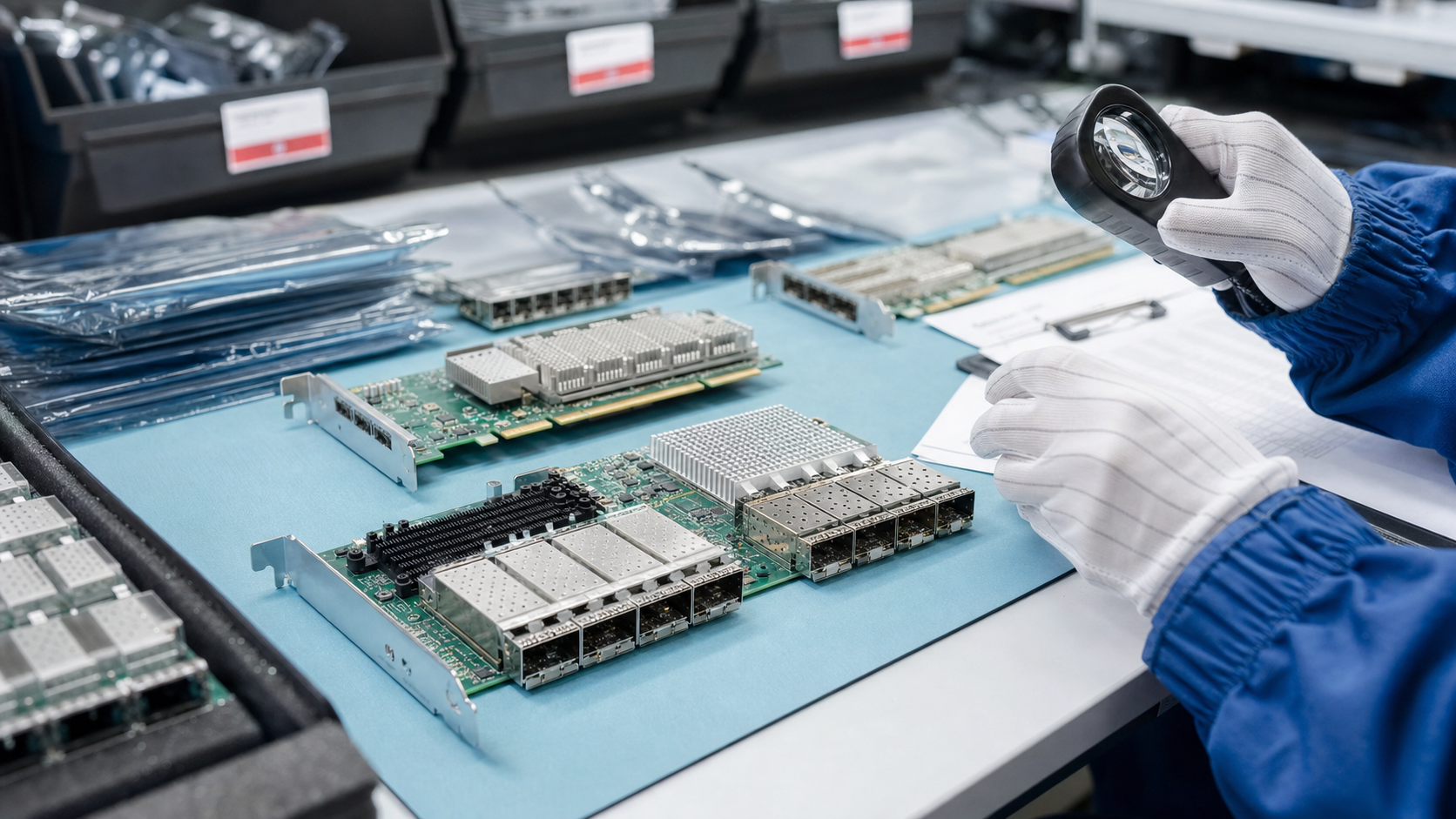
Network adapters are small compared with servers, switches, storage shelves, and GPU systems, but they can control whether a project actually comes online. The card has to fit the chassis, negotiate with the switch, accept the planned optics or cables, run the right driver and firmware, and survive shipment with ports and edge connectors intact.
TBR Trade Group helps buyers source broader server and data center hardware, and NIC requests are strongest when they include the server model, exact adapter part number, port speed, connector type, form factor, quantity, switch environment, destination, and acceptable substitutions. Treat the adapter as part of the network design, not just an accessory.
Start With the Platform and Slot
The first buying question is not "10G, 25G, or 100G?" It is whether the adapter physically and electrically belongs in the target server. A PCIe add-in card, OCP mezzanine card, blade mezzanine adapter, proprietary daughter card, and low-profile NIC can all serve the same networking purpose while requiring different slots, brackets, airflow, risers, and platform support.
PCI-SIG says PCI specifications define standards that drive compatibility across peripheral interconnects. For buyers, that compatibility still has practical limits. You should confirm the PCIe generation, lane width, card height, bracket style, riser orientation, power and cooling expectations, and whether the server vendor supports the adapter in that chassis. Intel's Ethernet portfolio is a useful example of how modern server networking spans both PCIe and OCP form factors across multiple speed families.
- Confirm the exact server model, slot type, riser, card height, and bracket requirement.
- Separate PCIe add-in cards from OCP adapters and proprietary mezzanine cards.
- Document the required part number and any acceptable alternate part numbers.
- Ask whether firmware, driver, and server BIOS support are known for the target platform.
Match Speed to the Whole Link
A used enterprise network adapter should be matched to the complete link path: adapter, transceiver, DAC or AOC cable, switch port, operating system, driver, firmware, and workload. A 25GbE port is not useful if the switch is 10GbE only. A 100GbE QSFP adapter may not solve the problem if the rack uses the wrong breakout cables, unsupported optics, or a mix of speeds that the switch cannot negotiate cleanly.
IEEE 802.3 develops Ethernet standards and lists active work that includes high-speed Ethernet projects such as 200Gb/s, 400Gb/s, 800Gb/s, and 1.6Tb/s. That matters for sourcing because older data center parts and newer fabrics can overlap in the resale market. The right used adapter can be a cost-effective bridge, but only when the quote names the target speed and physical media instead of relying on a vague "high speed NIC" description.
- Name the target speed for each port: 1G, 10G, 25G, 40G, 50G, 100G, 200G, or higher.
- Identify whether the link uses RJ45 copper, SFP+, SFP28, QSFP+, QSFP28, QSFP56, or another interface.
- Confirm whether DAC, AOC, or optical transceivers are included, optional, or buyer-supplied.
- Check switch compatibility before approving substitutions.
Optics and Cables Need Their Own Line Item
Adapters and optics are often quoted separately, which is fine as long as the buyer understands it. Problems start when a card arrives without the planned cables, when transceivers are coded for a different ecosystem, or when a passive DAC is too long for the installation. For a smooth order, define the connection type in plain language and keep optics out of the "assumed included" category.
Ask whether the supplier is providing bare adapters, adapters with transceivers, adapters with DACs, or a complete tested link pair. If you are connecting to an existing switch fleet, include the switch model and current transceiver policy. If the project involves both server adapters and switching, TBR's used enterprise network switches buying guide is a useful companion checklist.
- List required cable length, media type, and connector type before pricing.
- Do not assume every optic or DAC is accepted by every adapter and switch.
- Ask whether each port was visually inspected for cage, latch, and connector damage.
- Keep spare optics and cables labeled by speed, length, and intended platform.
Firmware, Drivers, and Workloads Matter
The same adapter can behave differently across operating systems, hypervisors, and server generations. Firmware level, driver branch, management tooling, PXE boot behavior, SR-IOV, VLAN offloads, iSCSI, RDMA, precision timing, and virtualization features may matter more than raw port speed. A resale listing that only says "dual port 25G" does not tell an infrastructure team enough.
Intel describes modern Ethernet adapters as serving data center, cloud, AI/HPC, edge, and management workloads, with features such as PCIe and OCP connectivity, flexible ports, security, timing, manageability, and power-efficient performance. Buyers do not need every feature on every order, but they should identify the features that are mandatory before accepting an alternate card.
Storage networking deserves special care. NVM Express notes that NVMe specifications cover host communication across transports such as PCIe, RDMA, TCP, and more, and the current NVMe specification set includes transport documents for PCIe, RDMA, and TCP. If the adapter will support NVMe/TCP, NVMe/RDMA, RoCE, iWARP, or another storage fabric, confirm protocol and driver requirements before the purchase.
Condition Checks Should Focus on Functional Surfaces
A used enterprise NIC can show normal cosmetic wear and still be perfectly useful. What matters most is whether the functional surfaces are clean and undamaged: edge connector, bracket, port cages, latch tabs, heatsink, labels, thermal pads, and any OCP or mezzanine connector. Bent brackets, crushed cages, missing labels, damaged heatsinks, corrosion, or heavy dust should be documented before shipment.
TBR's hardware condition guide can help set language for cosmetic wear, tested functional condition, pulled-from-working inventory, and known limitations. For bulk orders, ask whether adapters can be sorted by part number, port count, speed, bracket type, and cosmetic grade before packing.
- Inspect the edge connector, port cages, bracket, heatsink, labels, and mounting points.
- Confirm whether low-profile or full-height brackets are included.
- Ask whether the adapter has been cleaned and whether labels remain readable.
- Document substitutions clearly when exact part-number matching is not required.
Testing Should Match the Deployment Risk
"Tested" should describe what happened. For a used enterprise network adapter, practical testing can include visual inspection, system recognition, port presence, link detection, speed negotiation, firmware identification, and basic traffic checks. For a reseller batch, sort-and-count verification may be enough. For a production upgrade, buyers may need stronger evidence that the adapter links correctly with the intended speed and media.
For high-risk orders, ask the supplier to describe the test environment rather than promising unrealistic certainty. It is reasonable to ask whether the card was recognized by a compatible system, whether both ports came up, whether expected speeds were checked, and whether the final shipment matches the quoted part number and bracket. TBR's warranty, testing, and returns page can help frame DOA windows and replacement expectations before hardware moves.
Packaging Is Not an Afterthought
Network adapters have exposed edge connectors, metal brackets, port cages, heatsinks, and small components that can be damaged by loose packing. A few heavy adapters shipped together without separation can bend brackets or pressure the cages. Mixed orders are even riskier when NICs are packed with SSDs, memory, CPUs, power supplies, rails, or other metal parts.
The EOS/ESD Association publishes standards and guidance for electrostatic discharge and electrical overstress control in electronics environments, including working groups for packaging, grounding, worksurfaces, and gloves. For buyer purposes, the practical request is simple: adapters should be handled and packed with anti-static protection, separated from heavier items, cushioned against movement, and labeled so receiving teams can reconcile the order quickly.
For cross-border projects, combine the adapter checklist with TBR's international computer parts shipping checklist. Small parts can still create receiving delays when part numbers, quantities, declared descriptions, or destination requirements are unclear.
When Used Enterprise NICs Make Sense
Used network adapters are strongest when the buyer needs proven platform compatibility, fleet spares, lab capacity, affordable upgrade paths, reseller inventory, or a way to keep existing servers productive while a wider refresh is planned. They are less attractive when the project requires new-vendor warranty coverage, the fabric depends on a very new speed, or exact firmware and support entitlements are mandatory.
For many companies, the answer is not all-new or all-used. A practical plan might pair new top-of-rack switching with tested used adapters for compatible server fleets, or use tested adapters as spares for a stable installed base. TBR's used enterprise hardware page is a good starting point for comparing NICs with CPUs, memory, SSDs, GPUs, workstations, and complete server hardware.
Used Enterprise Network Adapter Buying Checklist
Before approving a used server NIC or OCP adapter order, confirm these details with the supplier:
- Server model, platform generation, slot type, riser, form factor, and bracket height are documented.
- Target part number, acceptable alternates, port count, port speed, and interface type are clear.
- Optics, DACs, AOCs, and cables are included, excluded, or quoted as separate line items.
- Switch model, transceiver policy, target speed, and media distance are known.
- Driver, firmware, operating system, hypervisor, RDMA, SR-IOV, PXE, or storage-fabric requirements are stated.
- Testing scope covers system recognition, port checks, speed negotiation, and visual inspection.
- Condition notes cover edge connectors, brackets, cages, labels, heatsinks, and mounting points.
- Packaging uses anti-static protection, separation, cushioning, and clear part-number labeling.
- DOA, replacement, return, and receiving timelines are agreed before shipment.
If you are sourcing tested enterprise network adapters, server parts, switches, storage components, workstations, GPUs, or mixed electronics inventory, include model numbers, quantities, target platform, condition expectations, accepted substitutions, and destination when you request a quote from TBR Trade Group.
FAQ
Can I buy a used enterprise NIC by speed alone?
No. Speed is only one requirement. You also need the server platform, slot type, PCIe or OCP form factor, bracket, port interface, optics or cable plan, firmware, driver, and switch compatibility.
Should optics be included with the adapter?
Only when the quote says so. Many adapters are sold bare, and optics or cables are separate. Define transceiver type, cable type, length, coding expectations, and switch compatibility before approving the order.
What testing should I ask for?
Ask whether the adapter was visually inspected, recognized by a compatible system, linked at expected speeds, checked across each port, and matched to the quoted part number and bracket type.
How should I request a NIC quote?
Send the server model, adapter part number, form factor, bracket height, port speed, connector type, switch model, cable or optic plan, quantity, condition preference, destination, and whether alternates are acceptable.
Source Notes
- IEEE 802.3 Ethernet Working Group: IEEE 802.3 develops Ethernet standards and lists active projects, including work related to 200 Gb/s, 400 Gb/s, 800 Gb/s, and 1.6 Tb/s Ethernet.
- PCI-SIG Specifications: PCI-SIG states that its specifications define standards that drive industry-wide compatibility for peripheral component interconnects, with recent PCI Express specifications and updates listed in its public library.
- Intel Ethernet Products: Intel describes its Ethernet portfolio as spanning data center to edge use cases, with PCIe and OCP adapter options, speeds up to 200GbE in current families, flexible ports, manageability, security, timing, and power-efficiency considerations.
- NVM Express Specifications: NVM Express explains that NVMe specifications define host communication with non-volatile memory across transports including PCIe, RDMA, TCP, and more, with NVMe 2.3 released on August 5, 2025.
- EOS/ESD Association Standards: The association publishes electrostatic discharge and electrical overstress standards for electronics environments, with working groups covering topics such as packaging, grounding, worksurfaces, and gloves.